By Paul Smith
Former Head of Test | Kaiwhakahaere Whakamātautau
It used to be that the petrol or diesel price shown on the forecourt was the price you paid. Then, discounting took hold. Now, Z Energy’s Sharetank lets you buy virtual fuel long before you need to fill up.
With Sharetank, you buy petrol (91 or 95) or diesel through the Z Energy app. The fuel is added to your virtual tank. You then draw down on that fuel when you physically fill up at a Z Energy garage, using the app at the pump. Your fuel can be shared by up to five others anywhere in New Zealand.
Our trial: a month with Sharetank
Julie commutes a 150km round trip between Kapiti and Wellington most weekdays, while Derek spends a lot of his working day on Auckland roads. They used Sharetank exclusively during February – Julie set up the virtual tank and invited Derek to share it.
Cheaper petrol and diesel

You can add fuel to your virtual tank 24/7 – you don’t even need be in your car.
The Sharetank owner can buy fuel at the lowest Z Energy price within a 30km radius of their location – the app shows the best price. You can add fuel to your virtual tank 24/7 – you don’t even need be in your car. For example, Julie bought petrol at the Petone price while sitting at her desk in Wellington (saving 23¢ per litre on the local price).
You can’t combine Sharetank with any other discounts. That means you have to decide whether it will be cheaper than using a fuel retailer’s discount scheme. With all the schemes on the market, finding the lowest cost option isn’t easy.
Tip:Use Gaspy to check the Sharetank price against other retailers to make sure you’re getting as good a deal as possible.
By pre-purchasing, you’re also gambling that the price won’t go down after you buy your virtual fuel and before you use it in your car. The chances of being caught out increase if you go big (you can add up to 1000L at a time). For example, after Julie bought 198L on a trip outside her local area, where prices were lower, fuel prices plummeted by 23¢/L. However, as price rises show no signs of slowing, you might not consider fuel prices dropping such a big risk.
Choosing the cheapest option
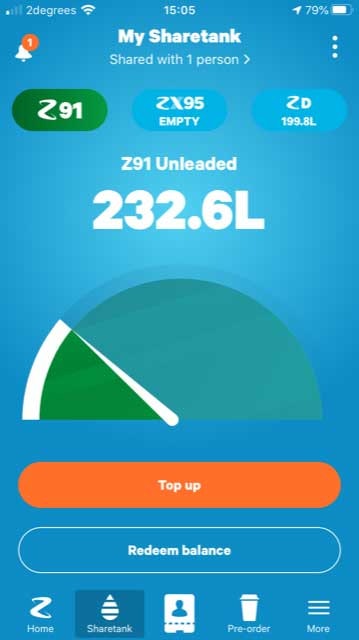
You can buy petrol (91 or 95) or diesel through the Sharetank app, which can be shared by up to five others anywhere in New Zealand.
When you fill up your car, the app will notify you if paying the pump price is the cheapest option. However, the comparison doesn’t include any discounts and the app doesn’t show the average price you’ve paid for fuel in your virtual tank. Not surprisingly, the Z Energy app won’t make any comparison to the price you could get at another local fuel retailer. This means it’s virtually impossible to make a true price comparison at the pump.
Sharing is caring
Julie added diesel to her virtual tank for Derek to use, as well as 91 petrol for herself. Only the Sharetank owner can add fuel. By sharing Julie’s virtual tank, Derek avoided paying the Auckland regional fuel tax. It sounds like a scam but, like all petrol suppliers, Z Energy pays the 10¢ tax on every litre pumped in the Auckland region.
Tip:Make sure the owner of the Sharetank can access the cheapest fuel.
Did our triallists save money?
Derek usually fills up at his local Mobil garage, because it’s convenient. He made a killing using Sharetank. During February, the diesel purchased in Sharetank averaged 127¢/L. At the times he redeemed his fuel, he wouldn’t have managed better than 145¢/L using a Mobil discount.
Julie watches fuel prices closely. She uses the AA Smartfuel scheme, and fills up at low-cost garages when prices are sharp. She paid more through Sharetank. Over February, her 91 petrol averaged 202.3¢/L. In the previous nine months, she paid an average 191.6¢/L. Even accounting for 230.9¢/L, the price at the end of January at her local BP, she would have paid a cent less per litre during February than she did with Sharetank.
Fake savings
Over February, Z Energy reckoned Julie saved 23¢/L on petrol and Derek saved 28¢/L on diesel – much more than the actual savings they achieved. That’s because Z compares the average Sharetank price to the Z Energy pump price at the location and time you redeem it. It doesn’t account for Z Energy discount vouchers or if a cheaper garage is offering a better price. Real savings with Sharetank are significantly lower – you might not save anything at all.
Triallists’ opinions
Julie and Derek had a good experience using the scheme.
Julie said she appreciated the convenience: not having to look out for discount days or offers from other retailers, or refuel in small amounts to achieve Smartfuel savings. However, she didn’t like pre-paying for large amounts of fuel (buying 198L of 91 petrol in Hamilton cost more than $400).
Derek found the app very easy to use and liked the speed and simplicity of redeeming fuel at the pump.
Our verdict
For Z Energy, Sharetank locks you in to buying its fuel, and adds a layer of obfuscation to what you’re paying and saving. It’s not a guarantee of cheap fuel – Z Energy has loaded the system in its favour. However, Sharetank is convenient and could save you money.
Would our triallists keep using it? Julie said she would add it to her suite of fuel-saving techniques – saving money was her main goal. However, she wouldn’t buy large amounts for her virtual tank and only pre-purchase fuel when she calculated it was a cheaper option. Derek would be happy to keep using Sharetank, but only if Julie buys the fuel so he can avoid paying Auckland prices.
Gaspy: the easy way to compare prices?
Comparing fuel prices is difficult: they aren’t advertised and retailers won’t tell you over the phone. Prices are shown on the forecourt, at least for regular 91 petrol and diesel (though not usually for premium fuel), but there isn’t an easy way to compare local prices. That was until Gaspy came along.
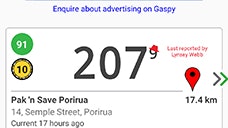
This crowd-fed app (available for Android and iOS) enables price comparison between fuel retailers. Gaspy users log in to the app and update or confirm prices at their local service station, which creates an accurate real-time snapshot of what they’re charging at the pump.
When looking for fuel, the app returns prices from all outlets within a set distance of your current location. Results are displayed along with information about when the price was reported, who logged it, and if it has been confirmed by other Gaspy users. You can sort results by price or distance from your location. You can select the type of fuel to re-display prices and re-order results. You can even load discounts you have through loyalty schemes or vouchers, which re-calculates prices to include the discount.
Gaspy prices aren’t limited to your location. You can search for prices anywhere in the country, which is useful for deciding where you should fill up on a longer journey. It also lets you see whether you are paying more or less than others around the country – though for Wellingtonians or South Islanders, where prices are notoriously high, it’s probably best not to look!